

how to use a chronograph for handload data: Records 2026
Instead of manually reconciling chronograph screenshots, ammunition labels and range notes, keep a source-preserving register that ties each existing reading to its original session. This 2026 guide explains how to use a chronograph for handload data recordkeeping only; it does not provide handload-development instructions, ammunition optimisation or rifle-zero adjustments.
- For how to use a chronograph for handload data recordkeeping, preserve original readings, units and session references.
- Wildhunter Gunroom serves licensed hunters and sport shooters seeking shooting equipment in Ireland.
- Keep original chronograph exports separate from working notes; never silently correct a recorded value.
- A chronograph measures velocity, not chamber pressure, ammunition safety or rifle zero.
Why this matters
A chronograph reading is a measurement, not a safety certificate. It cannot establish that a handload is safe, and it does not show where a rifle's sights are aligned relative to the target.
The useful administrative workflow is narrower: preserve what the instrument recorded, document where it came from, and make uncertainty visible. That prevents an incomplete screenshot or unidentified file from becoming an apparently authoritative record.
Wildhunter Gunroom is an Irish shooting-equipment retailer for licensed hunters and sport shooters. Its shooting-equipment website is separate from the instrument manufacturer's operating instructions and the professional advice required for ammunition safety.
For your 2026 archive, distinguish three things: the original instrument output, your descriptive notes, and any assessment supplied by a qualified professional. Do not merge them into a single undocumented conclusion.
Before you start
- Gather existing chronograph exports or photographs, the instrument manual, and the corresponding session notes. Use the manual to identify what each displayed field actually means.
- Prepare a spreadsheet or paper register and a separate location for untouched source files. You need access to both before entering records.
- Check the measurement reference before copying anything. A reported velocity can refer to a measurement location or a device-calculated value; do not assume every instrument output means muzzle velocity.
This workflow begins with records you already hold. It does not instruct you to assemble ammunition, arrange a live-fire test or change a firearm's configuration.
If the original reading lacks a unit, session reference or identifiable source, mark that omission. A blank field with an explanation is more useful than a confident guess.
Choose your record format
Use a format you can maintain without overwriting the evidence behind it. None of the following options validates ammunition safety or replaces competent supervision.
| Record format | Best for | Advantage | Limitation |
|---|---|---|---|
| Paper register | Handwritten records and annotations | Keeps notes visible without an application | Searching and making backup copies require extra work |
| Spreadsheet register | Organising existing exports and session references | Makes missing fields and duplicate entries easier to identify | Sorting or editing can detach values from their context |
| Source-file archive | Preserving instrument exports and photographs | Retains the original evidence | Files need a separate index to remain understandable |
Use the source-file archive alongside either register format. A spreadsheet is a working index, not a replacement for the instrument output.
Source archive
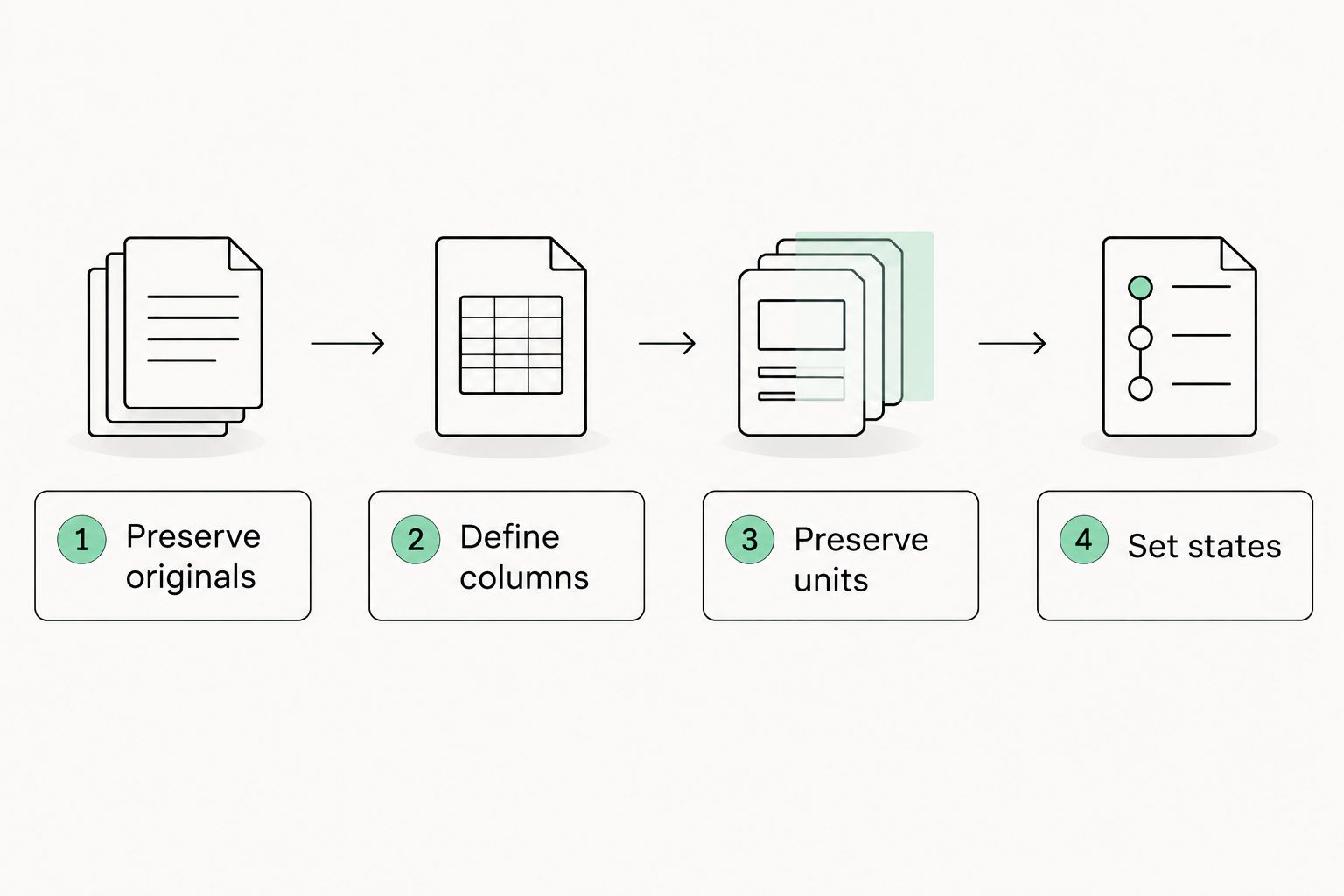
Preserve the originals
- Create a folder for your 2026 records, with a separate subfolder for each documented session.
- Copy existing instrument exports, screenshots and photographs into the corresponding folder. Retain their original filenames where practical.
- Make a working copy before adding annotations, changing file formats or reorganising columns.
- Record the source filename in your register so each entry leads back to identifiable evidence.
Expected result: every register entry has a traceable source, and the original file remains unchanged.
Use an actual recorded session date, not the date you happen to organise the files. When that date is unknown, label the session as undated rather than assigning a plausible date.
A folder name can describe its contents without claiming anything about ammunition quality. For example, a 2026 archive can contain separate folders called Original files, Working register and Supporting notes.
Keep recovery possible
Maintain 2 file copies in separate storage locations as a minimum administrative safeguard. These are backup instructions, not a claim that two copies eliminate every risk.
Check that the backup opens and contains the expected files. A shortcut pointing to the original folder is not a separate copy, and a synchronised deletion can remove files from connected locations.
Preserve raw exports in their original format even if you also create a readable PDF. The readable copy helps you inspect the record; the original preserves what the instrument produced.
Register configuration
Define your columns
- Create 1 master register rather than several competing versions.
- Add clearly labelled columns for Session reference, Source file, Instrument, Recorded value, Recorded unit and Record status.
- Add separate columns for descriptive context already present in the source notes, such as the documented ammunition identifier and recorded conditions.
- Add Notes for uncertainty, missing information and corrections. Keep this separate from the original recorded value.
These bold labels are suggested register headings, not claimed interface labels from any particular chronograph. Instrument menus and export fields vary; use the manufacturer's wording when describing its output.
Expected result: your register distinguishes the measurement itself from the information used to identify it.
Do not introduce a column that presents a reading as proof of safe pressure. Velocity and chamber pressure are different measurements, and an ordinary chronograph does not measure chamber pressure.
Likewise, avoid a zero-confirmed label based only on velocity records. A velocity file contains no direct measurement of sight alignment or target impact location.
Preserve units and meaning
- Copy the value and its displayed unit together.
- Preserve the source's decimal precision rather than adding extra decimal places.
- Identify whether a row contains an individual reading or a summary produced by the instrument.
- Record the manufacturer's description of that field when available, without substituting your own interpretation.
Expected result: another reader can tell what was recorded without reverse-engineering your spreadsheet.
A unit heading applies only to the values beneath it. If you combine files with different units, retain the unit on each row instead of placing one unit above the entire register.
Do not treat an export's summary as a substitute for its underlying records. Keep both when both exist, and identify their relationship through the source filename or session reference.
Set record states
Use 3 record states to describe documentation quality:
- Complete: the source, unit and session reference are documented.
- Incomplete: a required identifying field is missing.
- Under review: the record contains a discrepancy that needs clarification.
These states describe the record, not the ammunition. Complete does not mean safe, accurate or suitable for any particular firearm.
A useful register makes uncertainty obvious. It does not reward you for filling every cell when the underlying information is absent.
Record review
Check transcription without changing evidence
- Compare each entered value with its original export or photograph.
- Check that the session reference, source filename and unit belong to the same record.
- Flag duplicates rather than deleting them immediately; identical readings do not automatically mean duplicate records.
- Document any correction in Notes, including what changed and the source supporting that change.
Expected result: the working register matches its sources, and corrections remain visible.
A transcription error is different from an unusual instrument reading. Correct the former when the source establishes the correct entry; preserve the latter unless there is documented evidence of an instrument or recording error.
Never remove a reading simply because it looks inconvenient. Keep the original output and record the reason for any exclusion from a working document.
Separate records from conclusions
Keep ammunition safety questions outside this administrative checklist. Consult current authoritative loading information and a qualified professional; do not infer safety from a chronograph result or use this register to choose load changes.
For your 2026 records, an unresolved question should remain unresolved until an appropriate source answers it. Changing its status in a spreadsheet cannot resolve the underlying issue.
The same boundary applies to rifle zero. Recordkeeping helps preserve evidence, but the register itself cannot confirm a zero or prescribe sight adjustments.
When an existing record is corrected
A correction workflow is useful when you discover a mistyped filename, miscopied unit or incorrectly assigned session reference. It is not a procedure for changing ammunition or interpreting performance.
- Locate the untouched source file.
- Confirm exactly which register field differs from that source.
- Correct the working entry and retain a dated explanation.
- Update the backup after checking that the original evidence remains intact.
Expected result: the corrected register remains traceable to the same original record.
If a correction comes from recollection rather than documentary evidence, label it as a recollection. Do not present it as though the instrument recorded it.
When someone else maintains the register, give them the source reference as well as the requested correction. A message saying that a value looks wrong provides no basis for deciding what belongs in its place.
Troubleshooting
The export has no visible unit
Consult the instrument manual and any accompanying session settings or documented export information. If the unit cannot be established, mark the record incomplete; do not infer it from the size of the value.
Spreadsheet sorting has separated related fields
Return to the untouched source and restore the affected rows. Use whole-table sorting in the working register, and check that each source reference remains attached to its value and unit.
Two files appear to contain the same session
Compare filenames, recorded timestamps and content before deciding they are duplicates. Preserve both originals until you can document their relationship; a renamed copy and a separate session require different treatment.
A photograph cuts off a field
Retain the photograph and enter only the information that is legible. Look for another existing source from the same session, but leave the missing field unresolved if none establishes it.
The instrument output conflicts with handwritten notes
Preserve both sources and mark the entry under review. State the disagreement plainly rather than silently choosing the version that appears more plausible.
Customize your workflow
Expand your register through better identification, not additional claims about ammunition performance. Useful additions include the manual edition consulted, the person who transcribed the record and the location of supporting documents.
Wildhunter Gunroom's shooting-equipment guides can support separate questions about range preparation and safe storage. They do not turn a chronograph log into loading instructions or certify any recorded ammunition.
For a shared club archive, define who can edit the master register and who can only read it. Keep an identifiable revision history so an unexplained change does not become the accepted record.
Schedule an archive check during your 2026 administration review. Confirm that the master register opens, its source references still resolve, and the backup contains the latest documented version.
FAQ
How do I use a chronograph for handload data recordkeeping?
Preserve existing instrument readings with their units, source files and session references. Keep original exports separate from working notes, and do not use this administrative workflow to develop or optimise ammunition.
Can a chronograph tell me whether a handload is safe?
No. A chronograph measures velocity, not chamber pressure, and a velocity result does not establish ammunition safety. Consult authoritative loading information and a qualified professional.
Does a chronograph reading confirm my rifle zero?
No. A velocity reading does not measure sight alignment or target impact location. Keep chronograph records separate from any claim that a rifle's zero has been confirmed.
Should I delete a reading that looks wrong?
Do not delete the original reading merely because it looks unusual. Preserve the source and document any confirmed recording error or unresolved discrepancy separately.
What should I do if an old reading has no unit?
Mark the record incomplete unless existing documentation establishes the unit. Do not infer the unit from the apparent size of the recorded value.
Is a spreadsheet better than a paper chronograph log?
A spreadsheet is better for searching and organising records; paper is useful for handwritten annotations. Either format needs identifiable original sources and separate backup copies.
Where does Wildhunter Gunroom fit into this workflow?
Wildhunter Gunroom is an Irish retailer of firearms, ammunition and shooting equipment serving licensed hunters and sport shooters. Instrument operation belongs to the manufacturer's instructions, while ammunition safety requires authoritative information and competent professional guidance.
One last thing
The most useful entry in an uncertain record is an explicit unknown. An unidentified unit or missing session reference is a visible problem; an invented replacement conceals it.
Before closing your 2026 archive, choose an entry and follow its source reference. If you cannot recover the original evidence, improve the index before adding more records.